Example Scanning and Processing
Example 1.
Image is scanned in using a standard scanner. Image scanned size was 1100 x 1500 pixels. There was little point in going higher than this because the image was out of focus.

Raw acquired image with no processing.

Straighten the image and crop it to remove the frame

Adjust the levels to get a better range of mapping between the lightest and darkest shades. This is different to adjusting the brightness, which shifts everything up or down. Here the image is stretched from “black to white” as far as practically possible.
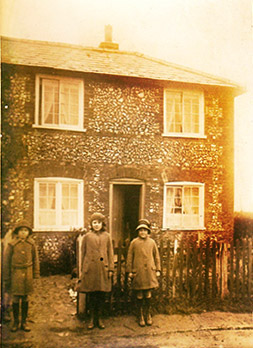
Here an overlay has been placed above the image and selectively darkened and lightened to compensate with the original image which was over exposed to the right and under exposed to the left. (Photoshop CS6). Note that the process has now made the colour cast worse where I have had to darken the image. 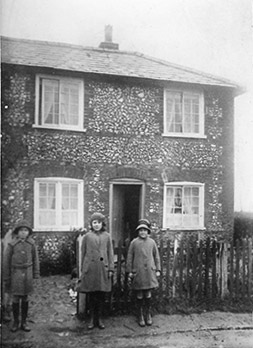 Next remove the colour information by converting the image to black and white. In this case I do have some control over what colours map to which shades of grey. However as the image is largely monochrome I do not have a lot of lattitude. In this case it is a subjective assessment of the image using the default settings.

Finally using a clone brush remove noise and dirt from the image. There is a black blob on the centre girl’s coat which has been removed, and there is a white blob on the side of the house which has also been removed. The last step is to crispen the image by applying the focus filter. It will not always work, so discretion is recommended.
This would be the final image that we store as a master based on the original.
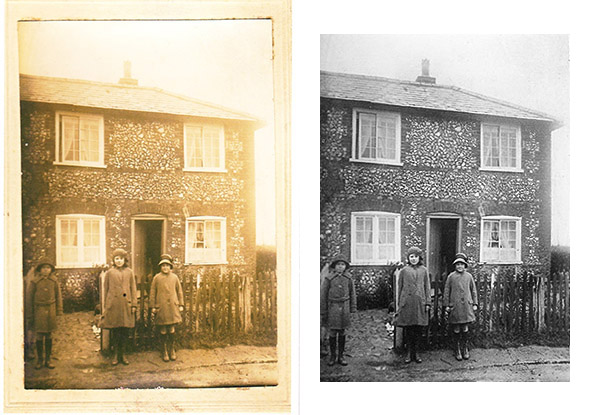
To recap, I have placed the original and the final processed images next to each other for comparison.
Two further examples
The two sets images below show before and after restoration. These images are nearly 100 years old, and had spent much of their time in the loft along with a lot of other old photographs. Each one took around 40 minutes to edit to get to this level of restoration.
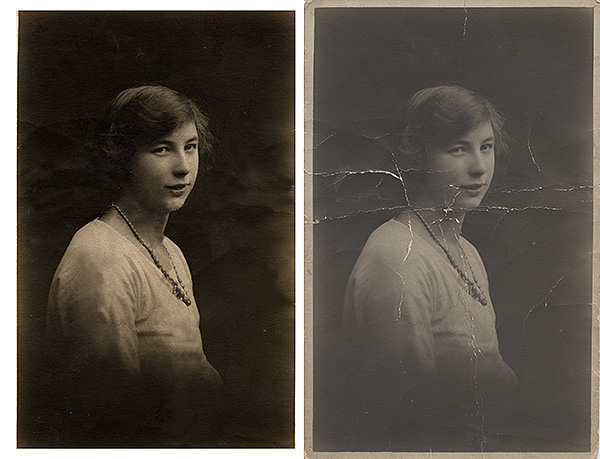

Photograph capture and digital restoration by Mark Wingrove.
Return to Acquiring images
Return to Home